
Pattern design is the silent workhorse of the visual world. It dictates the feel of a fashion collection, the bounce of a website background, and the texture of product packaging. For decades, creating a seamless repeat was a manual, mathematically tedious process involving tracing paper and light tables. Today, a suite of dedicated pattern design tools has transformed this craft, allowing designers to generate complex geometric tessellations and organic surface textures in minutes. However, with options ranging from free browser-based utilities to expensive industry standards, choosing the right tool is the first major design hurdle.
This guide breaks down the current landscape of pattern design software. We will analyze the specific strengths and weaknesses of the leading contenders, compare their pricing structures, and help you determine which tool fits your specific workflow—whether you are a textile engineer, a graphic designer, or a hobbyist creating digital scrapbook paper.
Why Dedicated Tools Beat Generic Software
Before diving into specific applications, it is crucial to understand the technical distinction between a standard vector editor and a dedicated pattern tool. Software like Adobe Illustrator is a generalist; it can create patterns, but it requires manual calculation of tile sizes and precise alignment of edges to ensure a seamless flow. A dedicated pattern tool automates this process.
These specialized tools use algorithms to handle the "repeat" mathematics for you. They allow you to see the tiled result in real-time, preventing the common rookie mistake of creating a motif that has visible seams or awkward jumps. Furthermore, many modern tools offer "half-drop" and "brick" repeat options at the click of a button—layouts that are incredibly tedious to build manually. By using a dedicated tool, you are not just saving time; you are unlocking a level of geometric complexity that is nearly impossible to achieve freehand in a generalist environment.
Top-Tier Professional Suites: The Industry Standard
For professionals in fashion and interior design, the choice often comes down to specialized high-end software that integrates directly with production hardware. These are not lightweight tools; they are comprehensive ecosystems designed to handle complex color separations and printing processes.
Adobe Illustrator (With Pattern Making Plugins)
Illustrator remains the default vector workhorse, but its native pattern options are limited to basic grid and brick layouts. To make it a true pattern tool, professionals rely on plugins like Astute Graphics' Phantasm or Texturino. The power here is unlimited creative freedom combined with the plugin’s ability to preview seamless repeats in real-time. However, the subscription cost is a barrier for casual users, and the learning curve is steep.
Repper
Repper is a standalone application that focuses exclusively on pattern generation. It utilizes a proprietary algorithm that allows users to upload a single motif and instantly transform it into hundreds of unique, mathematically perfect repeats. It is particularly strong for creating complex, kaleidoscopic patterns that would take hours to construct manually. The downside is that it is a "black box" for generation; you have limited control over individual vector paths compared to Illustrator.
The Rise of Browser-Based Pattern Generators
Not every pattern design task requires a $50/month software subscription. For web backgrounds, social media assets, and quick ideation, browser-based tools have become surprisingly powerful. They are perfect for designers who need a quick asset without the overhead of a full application install.
These tools are excellent for generating raster-based patterns (PNG/JPG) but often fall short when you need infinitely scalable vector output. However, the speed of iteration is unmatched. You can adjust color palettes and scale in real-time, exporting a high-resolution image in seconds. For those looking to create quick visual content, these are essential. If you are in the business of creating rapid visual content, you might also find value in tools that streamline other aspects of graphic creation, such as Reaction Gif Creators for engaging social media posts or Photo Collage Apps for layout inspiration.
Comparison Table: Tools at a Glance
To help you compare the core functionality and costs, here is a breakdown of the most prominent tools currently on the market. Pricing is based on the latest subscription tiers as of this writing.
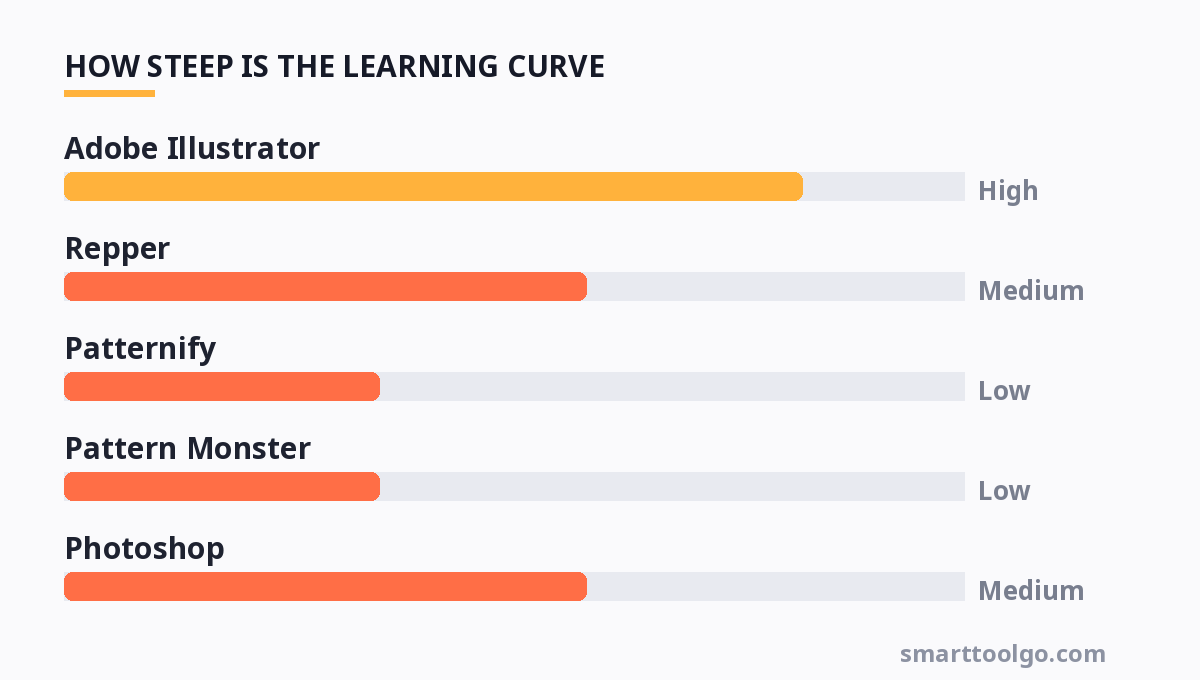
| Tool | Best For | Output Type | Pricing Model | Learning Curve |
|---|---|---|---|---|
| Adobe Illustrator | Professional vector textile design | Vector (AI, SVG, EPS) | $22.99/mo (Single App) | High |
| Repper | Complex kaleidoscopic repeats | Raster & Vector Export | $9.00/mo or $99 one-time (Pro) | Medium |
| Patternify | Quick CSS background patterns | CSS Code / PNG | Free | Low |
| Pattern Monster | SVG generation for web | SVG (Code & Download) | Free (Attribution) / $9.99 Pro | Low |
| Photoshop | Raster texture and photo patterns | Raster (PSD, PNG, JPG) | $22.99/mo (Single App) | Medium |
| Stitch Painter | Cross-stitch and embroidery | Raster (PDF, PNG) | $4.99 (Mobile) / $39 Desktop | Low |
Workflow Integration: From Screen to Fabric
Choosing a tool is only half the battle; the other half is ensuring your workflow is efficient. A pattern is rarely the final product—it is a component of a larger design. For fashion designers, the pattern must eventually be loaded into a CAD system (like Optitex or CLO3D) to simulate draping. For this, you need a tool that exports clean, layered vector files (AI or SVG) with proper color separation.
For digital product designers, the priority is file size and resolution. A background pattern for a website must be a small file to ensure fast loading times. Here, tools that generate pure CSS or SVG code (like Pattern Monster) are superior to exporting a massive raster image. If you are creating patterns for digital planning, you will likely need to integrate your designs into a document layout. In that case, understanding the capabilities of Planner Template Makers can help you understand how your pattern will tile across a page spread.
Practical Tips for Seamless Pattern Creation
Regardless of the software you choose, the principles of good pattern design remain constant. Here are three technical tips to elevate your work:
1. Mind the "Gutter" Space: When creating a tile, ensure there is adequate negative space around your motif. If your elements touch the edges of the bounding box, they will appear to "collide" in the repeat. Use a consistent padding to allow the pattern to breathe.
2. Use the "Offset" Filter for Testing: In Photoshop, you can test your repeat instantly by applying the "Offset" filter (Filter > Other > Offset) and setting the horizontal and vertical values to half the tile size. This shifts the edges to the center, revealing any seams immediately. This trick works even if you are designing in a raster tool before moving to a vector one.
3. Color Management is Key: For textile printing, screen colors will not match Pantone swatches perfectly. Always convert your pattern to a CMYK color profile before sending it to a printer. For web use, ensure your colors are consistent in sRGB to avoid color shifts across different monitors.
Free vs. Paid: The Real Cost-Benefit Analysis
The "free" tier of many pattern tools is often enough for mockups and web use. However, there is a hidden cost: time. Free tools often watermark outputs or lock high-resolution exports behind a paywall. If you are a professional selling your patterns on marketplaces like Spoonflower or Creative Market, a $10/month investment in a tool like Repper can pay for itself with a single sale.
On the other hand, if you are a student or a hobbyist, the free tier of Patternify or the free web version of Pattern Monster is more than sufficient. They allow you to learn the mechanics of repeats without financial commitment. The key is to match the tool's output capability to the specific demands of your project. Don't buy a Ferrari to drive to the grocery store; use a bike.
For more, check out: and website design tools.
For more, check out: .
For more, check out: top 10 productivity tools to boost your workflow in 2026.
Frequently Asked Questions
Can I use Canva to create seamless patterns?
Canva has a basic "Background" feature that allows you to create simple grid patterns, but it lacks the advanced tiling options (like half-drop or brick) necessary for professional seamless repeats. It is fine for simple social media posts, but for print-on-demand or textile work, you will need a dedicated tool like Repper or Illustrator.
What is the best file format for pattern printing?
For physical printing, Vector files (SVG, AI, EPS) are always preferred because they are resolution-independent. This means they can be scaled to any size—from a phone case to a billboard—without losing quality. Raster files (PNG/JPG) are acceptable for digital use but must be created at a high DPI (300+) for print to avoid pixelation.
Is it easier to make patterns in Photoshop or Illustrator?
It depends on the style. Illustrator is better for geometric, flat, and clean vector patterns. Photoshop is better for painterly, textured, or photo-based patterns. Illustrator is generally easier for the repeat math itself, while Photoshop is easier for creating organic textures.
How do I price my patterns if I sell them online?
Pricing depends on licensing. For a non-exclusive, standard commercial license (allowing a buyer to use it on up to 100 products), a single seamless pattern typically sells for $15 to $50 on marketplaces like Creative Market. Exclusive rights (where you sell the copyright) can fetch $200 to $1,000+, depending on the complexity and the buyer's brand size.
Can I create a pattern from a hand-drawn sketch?
Yes. Scan your sketch at 600 DPI, then use the "Image Trace" function in Illustrator to convert it to a vector. Once vectorized, you can clean up the paths and use the Pattern Options panel to build your tile. This is a standard workflow for illustrators moving into surface design.
Selecting the right pattern design tool ultimately boils down to your output destination. For high-volume, professional textile production, the vector precision of Illustrator remains the gold standard. For rapid ideation and web assets, the browser-based generators offer incredible speed and efficiency. By understanding the mechanics of tiling and the specific strengths of each software category, you can ensure that your designs are not only beautiful but also technically flawless in their repeat.
Get one practical tool tip a week
Short, useful, no spam. Unsubscribe anytime.