
Motion graphics have evolved from a niche broadcast specialty into the backbone of modern digital communication. They are the kinetic typography in your favorite app’s onboarding flow, the data visualization in your morning news briefing, and the 3D product reveals on your social feed. But the field is crowded, and the tool landscape is shifting faster than a 60fps timeline. Whether you are a video editor looking to upskill or a graphic designer tired of static layouts, this guide breaks down the real state of motion design in 2026—without the hype.
The Shift from Keyframes to Nodes: Why Your Workflow is Outdated
The biggest misconception about motion graphics is that it still revolves around manually setting keyframes on a timeline. While that remains the foundation, the industry has pivoted toward procedural and node-based workflows. Tools like Unreal Engine’s MetaHuman Animator and Houdini are pushing real-time rendering, but even mainstream software like After Effects has embraced expressions and JavaScript-based automation. The practical takeaway? If you are spending hours adjusting easing curves manually, you are losing the efficiency war. Modern motion designers write scripts to automate repetitive tasks, use physics-based simulations for secondary motion, and rely on data-driven animation to handle dynamic content. The skill of "tweening" is dead; the skill of "problem-solving through motion" is the new standard.
Tool Comparison: Motion Graphics Software in 2026 (Real Pricing)
Choosing a tool is about matching your project’s complexity, your team’s skill, and your budget. Below is a non-biased comparison of the five tools that dominate professional pipelines today. Prices are based on standard monthly subscriptions as of this writing, and we have included the hidden costs—like render farms or plugin ecosystems—that often catch newcomers off guard.
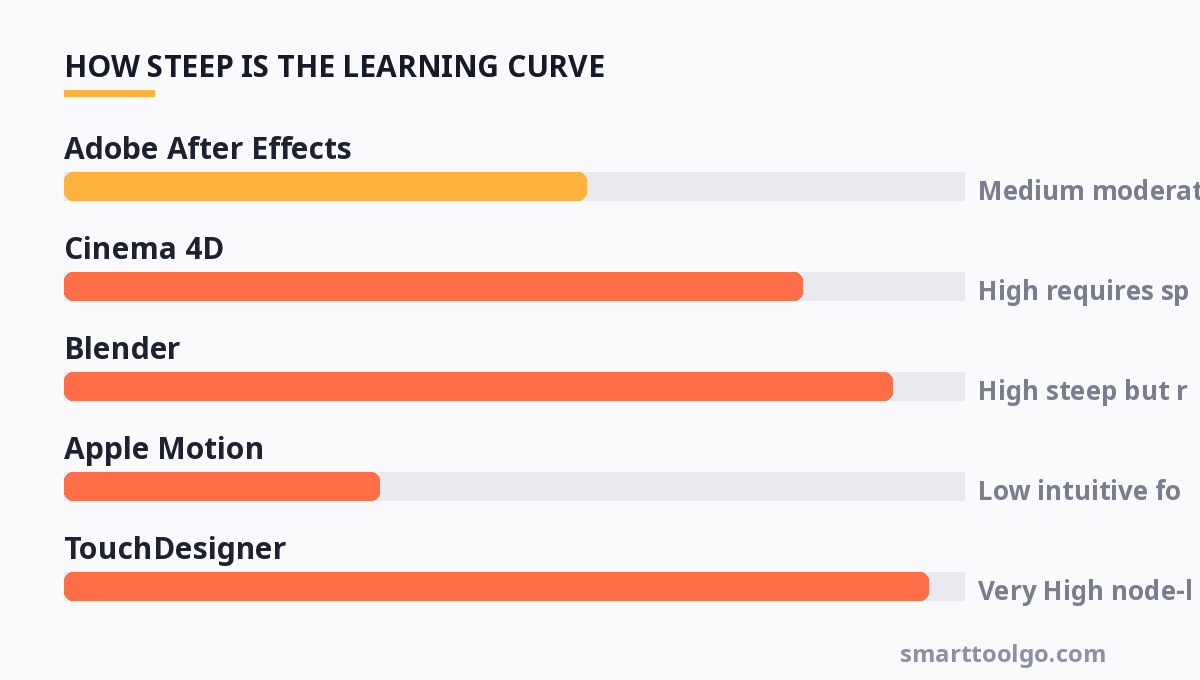
| Tool | Best For | Pricing (Monthly) | Hidden Cost | Learning Curve |
|---|---|---|---|---|
| Adobe After Effects | 2D UI animation, kinetic type | $22.99 (Single App) | Plugins (i.e., Trapcode Suite $999) and RAM requirements | Medium (moderate for basic, steep for expressions) |
| Cinema 4D | 3D motion graphics, MoGraph cloning | $94.99 (or $37.99 with Adobe bundle) | Third-party renderers (Octane/Redshift) cost extra | High (requires spatial thinking) |
| Blender | Open-source 3D, VFX, full pipeline | $0 (Free) | Hardware upgrade for viewport performance | High (steep but rewarding) |
| Apple Motion | FCPX integration, real-time 2D/3D | $50 (One-time) | Limited plugin ecosystem compared to AE | Low (intuitive for FCPX users) |
| TouchDesigner | Interactive installations, real-time visuals | $120 (Pro) / Free (Non-commercial) | GPU requirements for complex node networks | Very High (node-logic is a different paradigm) |
| Rive | Interactive UI/UX motion for apps | $25 (Pro) / Free (Starter) | State machine complexity for advanced interactions | Low (if you know vector design) |
Note: Prices are subject to change. The "Hidden Cost" column is critical—many creators buy the base software and then realize the industry-standard plugins cost more than the software itself.
Mastering the "Squash and Stretch" of Data: Motion for UX/UI
Static UI is dead. Users expect micro-interactions that guide them through a digital product. The most in-demand motion graphics skill in 2026 is not broadcast animation—it is UI motion design. This involves animating interface elements like toggles, menus, and loading states. The key difference from traditional video work is the constraint: file size must be tiny, performance must be 60fps, and the animation must respond to user input. Tools like Rive and Lottie have replaced GIFs and video files for these tasks. The practical tip here is to learn easing principles specifically for interfaces. A button that eases out too slowly feels laggy; one that eases in too fast feels jarring. Study the Material Design motion guidelines—they are the closest thing to a "rulebook" for this niche. If you are coming from a video background, forget about 30fps cinematic blur; you need crisp, frame-perfect logic that respects the user’s attention span.
AI in Motion Graphics: Hype vs. Actual Workflow Utility
There is a lot of noise about AI generating video, but the reality of AI in a professional motion graphics pipeline is more nuanced. AI is not replacing the animator; it is replacing the tedious parts of the job. Here is where it actually works today:
- Rotoscoping: Tools like Runway ML and After Effects’ Roto Brush 3.0 have cut masking time by 80%. You still need to clean up the edges, but the manual frame-by-frame work is gone.
- Upscaling: Topaz Video AI is the standard for upscaling 1080p renders to 4K without the "oil painting" artifact. This is a massive time-saver for stock footage integration.
- Idea Generation: Midjourney can generate style frames for client presentations. It is excellent for moodboarding, but useless for actual production because the output is rasterized and un-layered.
The "hype" is in text-to-video tools like Sora or Runway Gen-3. They are impressive demos, but they lack the control required for corporate branding or precise product visualization. The motion designer’s job security lies in control—clients do not want a "good enough" animation; they want pixel-perfect alignment with their brand guidelines. Use AI for the grunt work, but keep your keyframes manual for the creative decisions.
Portfolio Strategy: What Clients Actually Want to See (and What Gets You Hired)
Forget the "showreel" with a dubstep soundtrack. In 2026, clients are looking for problem-solving, not just pretty visuals. A junior portfolio filled with abstract particle simulations is less valuable than a portfolio that shows a "before and after" of a complex data dashboard you animated. When building your portfolio, focus on three things:
- Case Studies: Show a 30-second clip, but then show a slideshow of your wireframes, your easing curves, and your iteration process. Clients hire thinkers, not just clickers.
- Breadth of Style: If your reel is all neon sci-fi, you will be typecast. Include a clean corporate piece, a playful 2D character animation, and a serious 3D product render. This shows adaptability.
- Performance Metrics: If you worked on a web animation, state the load time impact. If you made a social video, state the retention rate increase. Treat your design like a business asset.
Don't forget to diversify your creative inputs. Looking at static design trends can spark motion ideas—check out Art Prompt Libraries for visual inspiration that can be translated into keyframe concepts, or explore Digital Sticker Packs to study how simple, looping animations are designed for mass communication. The best motion designers are visual hoarders; they collect static and animated references relentlessly.
The Business of Motion: Pricing Your Work and Avoiding Scope Creep
Pricing motion graphics is notoriously difficult because the time investment is invisible to the client. A 15-second logo sting might take 2 hours or 2 days, depending on the complexity of the 3D simulation. The most common pricing mistake is charging per second of video. This is flawed because a 10-second 3D render can take longer than a 60-second 2D infographic. Instead, price per project based on a day-rate. A professional freelance motion designer charges between $400 and $800 per day, depending on location and experience. For a 30-second social video, estimate your hours (concept, design, animation, sound, revisions) and multiply by your day-rate. Always include two revision rounds in your contract. The third revision is where profits die. Be explicit about what "minor revision" means—changing a color is minor; re-animating a character walk cycle is a new project. If you are working with digital assets, ensure your file management is solid; using tools like Digital Scrapbook Tools can help organize visual assets and moodboards for client presentations, keeping your creative process transparent and collaborative.
Performance Optimization: Rendering Smarter, Not Harder
Render times are the silent killer of motion graphics projects. You can have the most beautiful animation in the world, but if it takes 12 hours to render, your client is waiting and your hourly rate plummets. Here is a checklist to optimize your pipeline:
- Use Proxies: Edit with low-resolution proxies and swap to full-res for the final render. Do not animate with 4K footage if you don't have to.
- Cache Smart: In After Effects, enable "Cache Frames When Idle." In Blender, use "Persistent Data" for the render engine. This saves hours on multi-frame renders.
- Render Passes: Split your render into passes (diffuse, specular, shadows, ambient occlusion). This allows you to tweak colors in compositing without re-rendering the entire 3D scene.
- Hardware Reality: A fast GPU (NVIDIA RTX series) is more important than a fast CPU for most modern render engines (Octane, Redshift, Eevee). Invest in RAM (64GB minimum) if you work with heavy After Effects compositions.
Finally, learn to use render queues and network rendering. If you have two computers in your studio, use one as a render node. The time you save learning this system is time you can spend on the creative side—or simply sleeping while the machine works.
For more, check out: and vector graphics.
For more, check out: .
For more, check out: .
Frequently Asked Questions
Is it necessary to learn 3D software to be a motion designer?
Not strictly, but it is becoming a differentiator. While 2D animation (After Effects, Motion) handles the majority of UI and explainer videos, 3D (Blender, Cinema 4D) is essential for product visualization and character work. Start with 2D to learn the principles of timing and easing, then add Blender—it's free and has a massive community for troubleshooting. You can achieve a "3D look" with 2D techniques (using fake shadows and parallax), but true 3D gives you camera freedom that 2D cannot match.
How long does it realistically take to become proficient?
Expect 6 to 12 months of consistent practice (2-3 hours daily) to reach a "hireable" junior level. Mastery takes 3-5 years. The learning curve is steep because you are combining design principles (composition, color) with technical software skills (expressions, rendering). The fastest way to learn is not tutorials, but client work—even if it's free for a non-profit—because real deadlines force you to solve problems quickly.
What is the best format for delivering motion graphics to clients?
It depends on the use case. For social media, H.264 MP4 in the platform's specified resolution (usually 1080x1080 or 1080x1920) is standard. For web, consider Lottie (JSON) or WebM for smaller file sizes and transparent backgrounds. For broadcast, ProRes 422 HQ is the safe bet. Always ask where the video will live before you render. Rendering a 4K master and then downscaling is always safer than rendering at a low resolution and trying to upscale later.
How do I handle a client who wants "viral" motion graphics?
Set expectations. "Viral" is a marketing outcome, not a design spec. Ask the client to define what they mean: Is it high shareability? Is it a specific trend (e.g., kinetic typography on a black background)? Look at the current trends in Art Prompt Libraries to find visual styles that are currently performing well. Then, present 2-3 distinct style frames. This shifts the conversation from "make it viral" to "make it look
Get one practical tool tip a week
Short, useful, no spam. Unsubscribe anytime.